


PowerPort Pro™ — Elevate Your Laptop, Charge 8 Devices, Fold Flat for Your Bag
PowerPort Pro™ — Elevate Your Laptop, Charge 8 Devices, Fold Flat for Your Bag
 High Quality
 FREE US Shipping
 Hassle Free Returns
Couldn't load pickup availability
Clear Out the Dongle Chaos — One Foldable Platform Elevates Your Laptop and Powers 8 Devices
If you’re using a MacBook or any laptop with two USB-C ports and drowning in adapters, PowerPort Pro™ is the streamlined solution. Just one USB-C cable to your laptop. Eight ports integrated out the back. Six adjustable heights to align your screen with your neck. Compatible with laptops or tablets from 10" to 17", supports up to 44 lbs, and folds flat for easy transport.

Stop Crawling Under Your Desk Every Time You Need to Plug In
Switching to USB-C-only brought a new hassle: dongle overload. A dongle for HDMI. Another for the SD card. A USB-A hub just for your mouse. A bulky charger brick. By mid-afternoon, your neck protests because your screen sits too low. The fix isn’t piling on adapters. It’s one slab that lifts, ports, and charges at 100W — folding flat when you pack up.
➤ Connect 8 Devices with a Single Slab, No Dongle Madness: 4K HDMI, two USB-A 3.0, USB-C data, SD, TF, plus 100W USB-C PD — every port built right into the slab beneath your laptop.
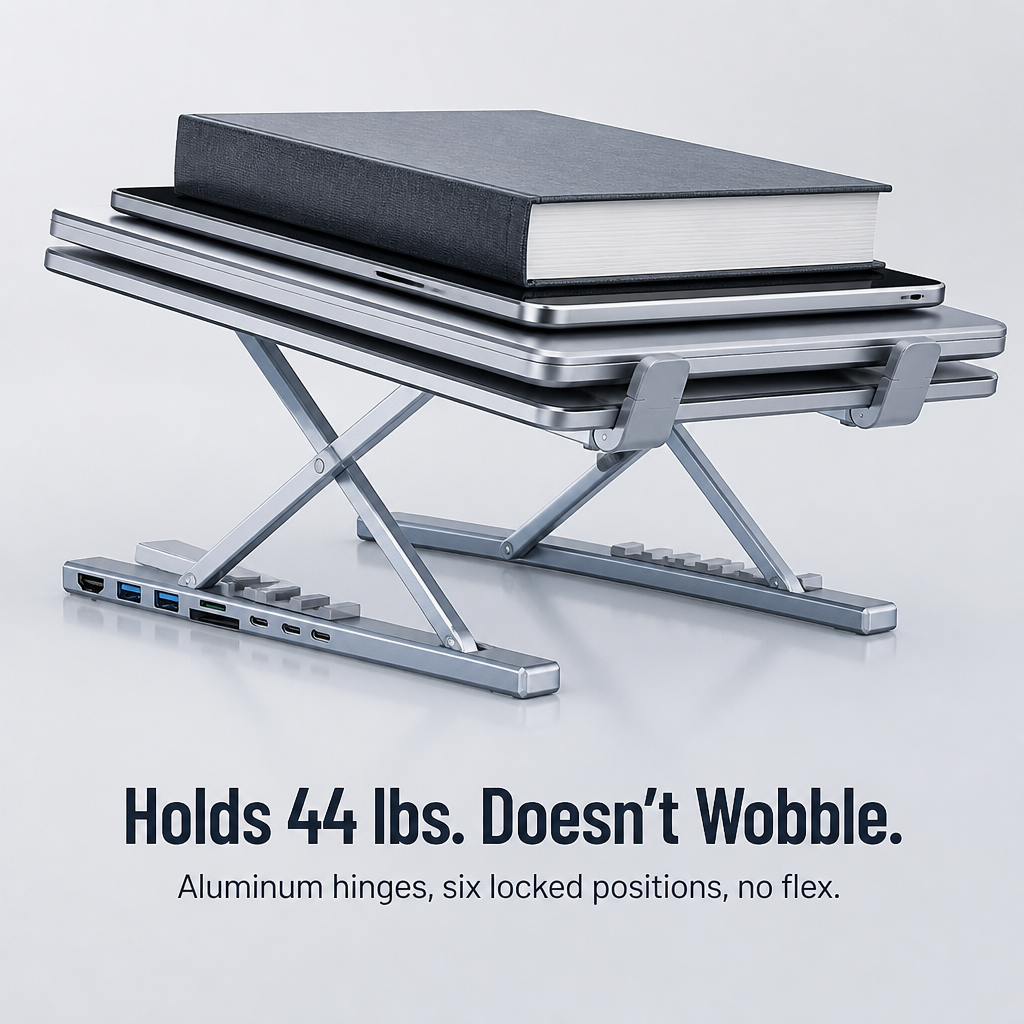
➤ Set Your Screen Height in Six Clicks: Aluminum hinges snap into six positions. Align with your chair, ditch the slouch, save your neck for post-work workouts.
➤ Collapse Flat, Toss It in Your Bag: Folds down to about the size of a paperback. Includes a carry pouch and USB-C cable. Ready at a coffee shop in under 10 seconds.

Introducing PowerPort Pro™ — One Aluminum Slab That Combines Three Essentials
It’s a laptop stand. It doubles as an 8-port dock. And it delivers 100W charging passthrough. All packed into a folded aluminum piece that sits between your laptop and desk. One USB-C cable links everything to your device. Unplug, fold the slab, and carry on.
The sturdy aluminum frame supports 44 lbs and locks into six fixed height levels with no wobble. Ports are arranged along the rear edge: HDMI 4K@30Hz, two USB-A 3.0 (5Gbps each), one USB-C data port (5Gbps), SD and TF card slots, plus a 100W USB-C PD input for fast charging your 16" MacBook Pro, iPad, Switch, or phone.

Why Remote Engineers and Creators Are Swapping Their Dongle Drawer for PowerPort Pro™
Reviews tell the same story: people start with a hub, a separate stand, and a 100W charger brick, then get frustrated by cables sprawling in every direction and the screen still sitting too low. One slab, one cable in, eight ports out — and the neck finally gets relief.
"I was juggling a hub, a stand, and a charger. Now my desk holds just a slab and a cable. The 100W on my 16" MacBook Pro is legit — no dimming, no fan freakout." — Marcus K.
"After three weeks, my neck quit the usual 3pm complaint. Didn’t expect that from a USB-C hub." — Priya S.

One Cable In. Eight Ports Out. Neck Pain Checks Out.
✓ One USB-C Input, Eight Ports Output: A single cable from slab to laptop clears cable clutter. Mouse, keyboard, monitor, drive, SD card, charger — all channeled through the slab.
✓ Six Locking Height Settings to Fit Your Chair: Snap to the angle that keeps your neck comfortable from morning emails to late calls. No more leaning, makeshift risers, or cluttered boxes.
✓ Genuine 100W Power and 5Gbps Data, Together: Quick-charge a 16" MacBook Pro while transferring 4K footage to an SSD. No compromises.
Set Up in Three Steps, Then Forget It’s Even There
Step 1: Unfold the aluminum stand, click it into one of six fixed heights, and place your laptop on it.
Step 2: Connect the included USB-C cable from the slab to your laptop. That’s your single connection.
Step 3: Plug your monitor, mouse, drive, charger, and SD card into the back of the slab. Step away. Your workspace is ready.

| PowerPort Pro™ | Separate Dongles & Hub | Plain Laptop Stand |
|---|---|---|
| ✅ 8 ports + stand combined into one aluminum slab | ❌ Multiple adapters tangled behind your screen | ❌ Just lifts the laptop. No extra ports. |
| ✅ Six locked height options, supports 44 lbs | ❌ Laptop sits flat — neck pays the price | ✅ Adjustable height, but offers no ports |
| ✅ 100W charging + 5Gbps data on a single cable | ❌ Budget hubs limit to 60W or lower data speeds | ❌ No charging or data — just metal support |
Full Specs for the Detail-Lovers
- Type: 8-in-1 USB-C Docking Laptop Stand
- Ports: HDMI 4K@30Hz, 2× USB-A 3.0 (5Gbps), 1× USB-C data (5Gbps), 1× USB-C PD input (100W), 1× SD card, 1× TF/microSD card, 1× USB-C host to laptop
- Material: Aluminum alloy
- Color: Silver
- Laptop/Tablet size: Fits 10" to 17"
- Max load: 44 lbs (20 kg)
- Height settings: 6 locked positions, foldable flat
- Includes: 1× PowerPort Pro™ Stand Hub, 1× USB-C cable, 1× carry pouch
The Questions You’re About to Type Into Google Anyway
Will it work with my MacBook? My Windows laptop? My iPad?
Yes, to all three, provided the device has a USB-C port that supports video output and power delivery. Compatible with M-series MacBooks, USB-C Windows laptops (XPS, ThinkPad, Surface), USB-C iPad Pro/Air, and most current Android tablets.
Can it fast-charge a 16" MacBook Pro?
Absolutely — connect a 100W USB-C charger to the PD input, and get full-speed charging for a 16" MacBook Pro, along with simultaneous data and video output on other ports. No dimming, no performance drops.
Is it stable when typing directly on the laptop?
Yes, the aluminum hinges lock securely at each height — no flex or wobble during typical typing. It supports up to 44 lbs, so your 16" MacBook Pro or Surface plus an additional tablet are safely supported.
Will my laptop get too hot sitting on it?
Quite the opposite — the open-frame design lifts your laptop off the desk, improving airflow underneath. Most users notice less fan noise compared to flat desk placement.
Does it fold small enough for travel?
Yes — folds flat to about the size of a paperback and includes a carry pouch. Fits snugly in your laptop bag alongside your device. Set it up at a café in under 10 seconds.

Test It at Your Desk for 30 Days — Or Return It
If PowerPort Pro™ doesn’t clear your dongle drawer and quiet the 3pm neck ache within 30 days, return it for a full refund — no restocking fees, no questions asked. This slab needs to prove it earns a spot on your desk. If it doesn’t, you pay nothing.


Rated 4.7 / 5 based on 1289 reviews. Showing our 5-star reviews.